Feature requests for iOS subscription apps

See what your paying subscribers want next.

A feature board inside your iOS app. Only verified subscribers can vote. No backend. Your coding agent sets it up in one prompt.

Free for one app. Open source. No credit card.

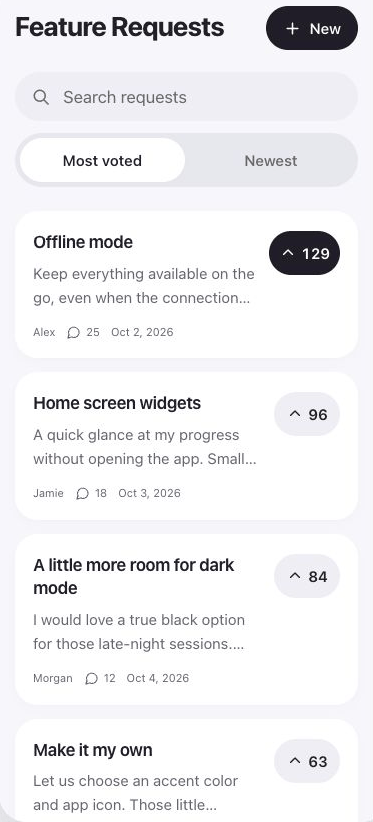
The Feedbapp board inside an iPhone app: requests such as Offline mode with 129 votes and Home screen widgets with 96, sorted by most voted.

Most feedback tools count every vote the same. A free trial that churned yesterday outweighs a subscriber who has paid you for two years. Feedbapp only lets people who are paying right now vote, so the top of your board is what your revenue is asking for.

How verified voting works

Apple already knows who's paying. We just ask.

  1. 1

    StoreKit checks the subscription on the device

    When someone opens the board, the SDK takes the subscription StoreKit 2 has already verified on their iPhone. No login screen, no email.

  2. 2

    The board checks Apple's signature

    The board verifies Apple's signature, your bundle ID, the product and the expiry date, then opens a short session that lives only in memory.

  3. 3

    Subscribers post and vote. Everyone else reads.

    Active subscribers can post, vote and comment. Anyone else can read the board and sees a short note that posting is for members.

No backend to run. You don't write a server, store receipts or manage accounts. Already have your own backend? Pass a token provider instead and keep your existing sign-in.

Setup

Two ways in. Both take minutes.

Paste this into your coding agent

Works with Claude Code, Codex, Cursor or any agent that can edit your Xcode project. Swap in your board's URL from the dashboard.

Add a Feedbapp feature request board to this iOS app.

1. Add the Swift package https://github.com/itsbauza/feature-board-ios (product: FeatureBoard, iOS 16+).

2. Find the app's settings screen and add a "Feature requests" row that pushes FeatureBoardView with url https://feedbapp.beltech.es/board/YOUR-BOARD and appStoreProductIDs: nil.

3. Pass contactSupport using the app's existing support action (email or help screen). If there is none, open a mailto: link.

4. Match the app's look with FeatureBoardAppearance: reuse its accent color, card color and corner radius.

5. If the app has an account deletion flow, also call AppStoreSessions(board:productIDs:).deleteMyContent() there.

6. Build the project and fix any errors. Don't change anything else.

Or add it yourself in SwiftUI

In Xcode: File → Add Package Dependencies, enter github.com/itsbauza/feature-board-ios, add FeatureBoard. Then:

import FeatureBoard

FeatureBoardView(
    url: URL(string: "https://feedbapp.beltech.es/board/my-app")!,
    appStoreProductIDs: nil, // or only some of your subscriptions
    contactSupport: ("Email support", { openURL(supportMailto) })
)
.navigationTitle("Feature requests")

Then turn on App Store subscriptions in the board's settings with your bundle ID and Apple ID.

Close the loop

“You asked, we shipped.”

When you mark a request as shipped, the people who voted for it see it in the board, with a badge in your app. Subscribers learn that asking works, so they keep asking, and keep paying.

  1. Asked A subscriber posts “Offline mode”.
  2. Voted 129 other subscribers vote it up.
  3. Planned You move it to planned, so everyone sees it's coming.
  4. Shipped Voters see “shipped” on their request next time they open the app.

Pricing

One app free. One flat price after that.

Free

$0

For one app.

  • Verified subscriber voting
  • Moderation: review before publishing, report and block
  • One-prompt agent setup
  • A small “Feedback by Feedbapp” link
Start free

Pro

$19/mo

or $149/yr. Up to 3 apps.

  • Everything in Free
  • Subscriber-vote breakdowns
  • Shipped notifications to voters
  • One integration: Slack, Telegram or webhook
  • Remove Feedbapp branding
Start free, upgrade later

Self-host

$0

Your server, your data.

  • The full board server, open source (AGPL-3.0)
  • MIT-licensed iOS SDK
  • One Docker container and a SQLite file
  • You run the updates and backups
View on GitHub

FAQ

Questions

Do my users need to sign up?

No. Their App Store subscription is their pass. The SDK sends what StoreKit has verified on the device, and the board opens a five-minute session in memory. There's no account and no email to collect.

What do people without a subscription see?

They can read every request and its votes. Instead of the post and vote buttons they see a short note that posting is for members, with a “Try again” button and your support contact.

Do I really not need a backend?

Right, if your app sells App Store subscriptions. If you already have your own backend and accounts, your server exchanges a server key for a session and the SDK takes a token provider instead. Never ship that key in the app.

How does moderation work?

You can review every post before it's published, and people can report and block. You get a dashboard to approve posts, change their status and reply. Pass a support action and the board shows a “Contact us” link at its foot. Apple reviews your app as a whole, so check your own listing against its guidelines.

What happens when someone deletes their account?

Call deleteMyContent() to remove what they posted, or anonymizeMyContent() to keep their feedback with nothing tied to them.

Does it match my app's design?

Yes. Pass your colors, corner radius and font, including asset-catalog colors for light and dark mode, and the board uses them before it draws.

Android, React Native or Flutter?

iOS first. Expo and React Native come next, then Flutter and Android, in the order paying customers ask for them.

Is it open source?

Yes. The server is AGPL-3.0 and the SDKs are MIT. Hosted Feedbapp is how we pay for uptime, backups and upgrades. You can always run it yourself.

Build what your subscribers will pay for.

Set up a board in a few minutes. Free for your first app.

Start free